Experiment 1: Arduino platform and LED control
The smallest complete embedded system: one output, one physical input, one command channel from a PC. Everything later is this pattern with different inputs, outputs and links.
Objective
- Learn
- the toolchain (IDE, board and port, compile, upload) and the Serial Monitor as the device’s only console.
- Program 1
- Blink an LED: output only, timed by the program. Proves the toolchain and the wiring.
- Program 2
- Control the LED from two sources: a physical button, and a command typed on the PC.
- Inputs
- button state on pin 2 (1 bit); bytes arriving on the USB serial link.
- Output
- LED on pin 13 (1 bit); status text back to the PC.
- Required behaviour
- button pressed: LED on. Byte
1: LED on. Byte0: LED off. Report every change.
System
There are two independent input channels and one shared output, so the program has to define priority: what happens if the button says one thing and the PC another? The code answers that by checking the button first and skipping the serial check while it is pressed (see the code).
Design decisions
LED on pin 13
- Why
- Pin 13 is also wired to the on-board LED (
LED_BUILTIN), so you get a second indicator for free and can tell a wiring fault (external LED dark, on-board LED blinking) from a code fault (both dark). - Alternative
- Any digital pin.
- Switch when
- If pin 13 is needed for something else (it is also SPI clock on the UNO).
220 Ω series resistor
- Why
- Sets LED current to about (5 − 2) / 220 ≈ 13.6 mA: bright, and under the pin’s ~20 mA safe limit.
- Alternative
- 330 Ω to 1 kΩ for a dimmer LED and lower current.
- Switch when
- Battery devices, or many LEDs on one chip (total current limits apply).
External 10 kΩ pull-down, button to 5 V
- Why
- Gives active-high logic: pressed reads HIGH, which reads naturally in code. 10 kΩ is high enough to waste little current (0.5 mA when pressed), low enough to beat noise.
- Alternative
INPUT_PULLUPwith the button to GND: no external resistor, but logic inverts (pressed = LOW).- Switch when
- When you want fewer parts; most production designs use the internal pull-up.
Commands are single ASCII characters
- Why
- One byte = one command, so parsing is a single
Serial.read()and a comparison. No framing, no buffer management. - Alternative
- Line-based commands (
ON\n) read withreadStringUntil('\n'), or a structured format like JSON. - Switch when
- Commands need parameters (
BRIGHT 128), or you need to detect corrupted or partial commands.
Button has priority, using an early return
- Why
- If the button is pressed, the rest of the pass is skipped, so the button always wins and serial input waits in the buffer.
- Alternative
- Keep a single
ledStatevariable that both inputs modify, and write the pin once per loop. - Switch when
- When you need defined behaviour on release (see Limits) or more input sources.
Timing with delay()
- Why
- Simplest possible timing; correct as long as nothing else needs to run.
- Alternative
- Compare
millis()with a saved time and toggle when 1000 ms have passed. - Switch when
- As soon as the board must do anything else while blinking.
What we did
Installed the Arduino IDE, connected the board by USB, selected the board type and the COM port.
The compiler targets a specific chip and pin map, and the uploader needs to know which serial port the bootloader is on. Wrong board: wrong pin numbers or failed upload. Wrong port: “not in sync”.
Opened File, Examples, 01.Basics, Blink; verified and uploaded it; watched the on-board LED.
A known-good program isolates toolchain problems from your own code and wiring.
Wired an external LED: pin 13, 220 Ω, LED anode; cathode to GND.
Moves the output off the board. Blinking in step with the on-board LED proves the external circuit.
Added the button between 5 V and pin 2, with 10 kΩ from pin 2 to GND.
Turns the open/closed switch into a defined HIGH/LOW for the input pin.
Uploaded the control sketch and opened the Serial Monitor at 9600 baud.
The monitor’s baud rate must equal
Serial.begin(9600), or bytes are decoded with the wrong bit timing and appear as garbage.Sent 1 and 0, and pressed the button; watched the LED and the replies.
Tests each input path and the status output.
Reading the circuit
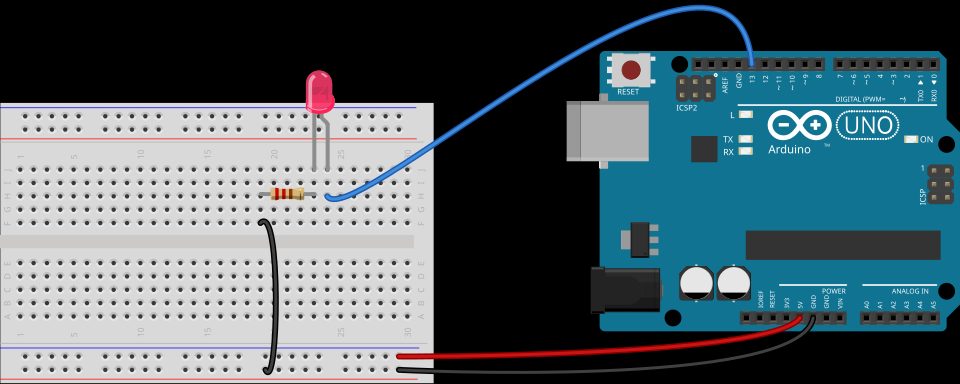
- The blue wire leaves digital pin 13: this is the output the sketch drives.
- It lands on a breadboard row with the resistor; the resistor’s other end meets the LED’s anode (the bent, longer leg).
- The LED cathode row goes by a black wire to the ground rail.
- The red and black wires from the board’s power header feed the breadboard’s 5 V and GND rails.
- Current path when pin 13 is HIGH: pin 13 → resistor → LED → GND. Order of resistor and LED in the loop does not matter; what matters is that they are in series.
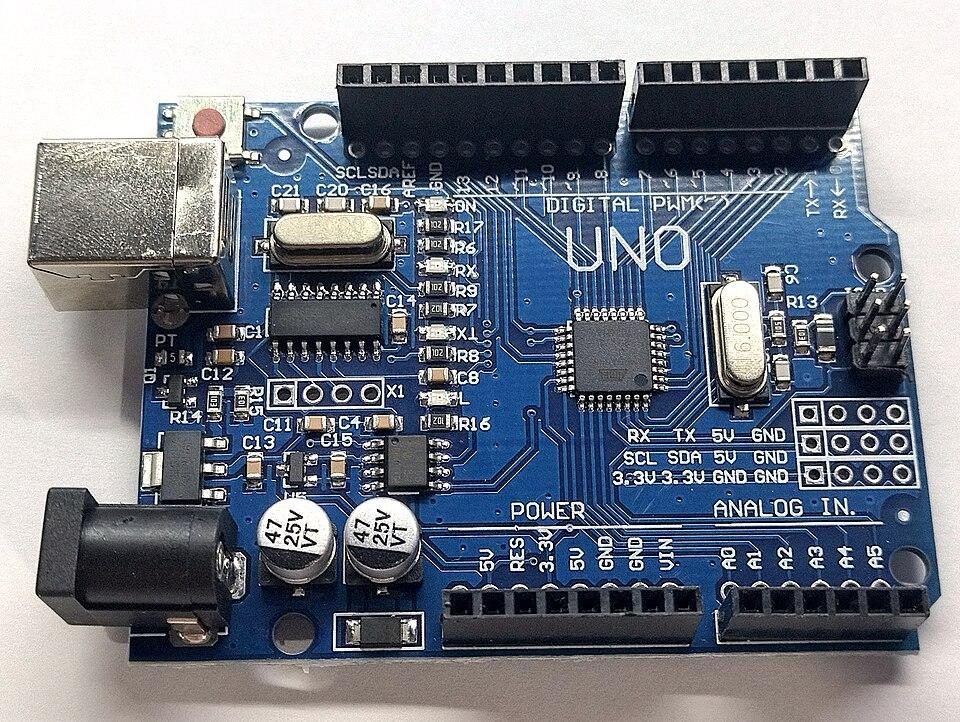
- Top header: digital pins 0 to 13. Pins 0 and 1 are the UART (RX/TX) shared with USB, which is why sketches avoid them.
- Pins marked
~can do PWM (3, 5, 6, 9, 10, 11 on the UNO). - Bottom: power pins (5 V, 3.3 V, GND, Vin) and analog inputs A0 to A5.
- Left: USB-B socket (power, upload, serial) and the barrel jack for 7 to 12 V.
Reading the code
Program 1: structure
No variables, no inputs. setup() configures one pin; loop() is a fixed sequence of writes and waits. The period is the sum of the delays: 2000 ms, so 0.5 Hz at 50 % duty. The entire timing comes from blocking delay().
Program 1: Blink
void setup() { // initialise digital pin LED_BUILTIN as an output pinMode(LED_BUILTIN, OUTPUT);} void loop() { digitalWrite(LED_BUILTIN, HIGH); // turn the LED on delay(1000); // wait for a second digitalWrite(LED_BUILTIN, LOW); // turn the LED off delay(1000); // wait for a second}- Lines 1 to 4Runs once after reset.
- Line 3Pin 13 becomes an output.
LED_BUILTINis a constant from the board definition (13 on the UNO), which is why the same sketch works on other boards. - Line 6The body of the core’s infinite loop.
- Line 7Drive the pin to 5 V: LED on.
- Line 8Block for 1000 ms.
- Lines 9 to 10LED off, block 1000 ms. Then
loop()returns and the core calls it again.
Program 2: structure
- State:
commandholds the last byte read. The LED state is not stored in a variable; it lives in the pin itself. - Control flow per pass: button check → (if pressed) LED on, report, 200 ms wait, return; otherwise → if a byte is waiting, read it and act.
- Timing: no fixed period. While the button is held, each pass takes about 200 ms. Otherwise a pass takes microseconds, so the board checks for input tens of thousands of times a second.
- Priority: button first; serial bytes wait in the 64-byte receive buffer until the button is released.
Program 2: Serial and button control
int ledPin = 13;int buttonPin = 2;char command; void setup() { Serial.begin(9600); Serial.println("Send 1 to switch the LED on, 0 to switch it off"); pinMode(ledPin, OUTPUT); pinMode(buttonPin, INPUT);} void loop() { if (digitalRead(buttonPin) == HIGH) { digitalWrite(ledPin, HIGH); Serial.println("Button pressed : LED ON"); delay(200); return; } if (Serial.available() > 0) { command = Serial.read(); if (command == '1') { digitalWrite(ledPin, HIGH); Serial.println("LED ON"); } else if (command == '0') { digitalWrite(ledPin, LOW); Serial.println("LED OFF"); } }}- Lines 1 to 3Globals: pin numbers as variables so wiring changes are one edit;
commandpersists across passes. - Line 6Starts the UART at 9600 bit/s: about 960 bytes per second with 8N1 framing (10 bits per byte).
- Line 7A start-up banner: seeing it confirms upload, reset and matching baud rate.
- Lines 9 to 10Plain
INPUTbecause the circuit already has an external pull-down. - Line 14Pressed button connects pin 2 to 5 V.
- Line 16Report the event.
- Line 17Rate-limits the report to about 5 per second while held, and incidentally hides contact bounce.
- Line 18Ends this pass of
loop()early, so the serial check is skipped while the button is down. - Line 21
available()returns how many received bytes are waiting in the buffer. - Line 22Removes one byte. Typing 1 sends the ASCII character
'1', value 49, not the integer 1. - Lines 24 to 26Byte
'1': LED on, confirm. - Lines 28 to 30Byte
'0': LED off, confirm. Any other byte, such as a newline the monitor appends, matches nothing and is silently ignored.
Reading the outputs
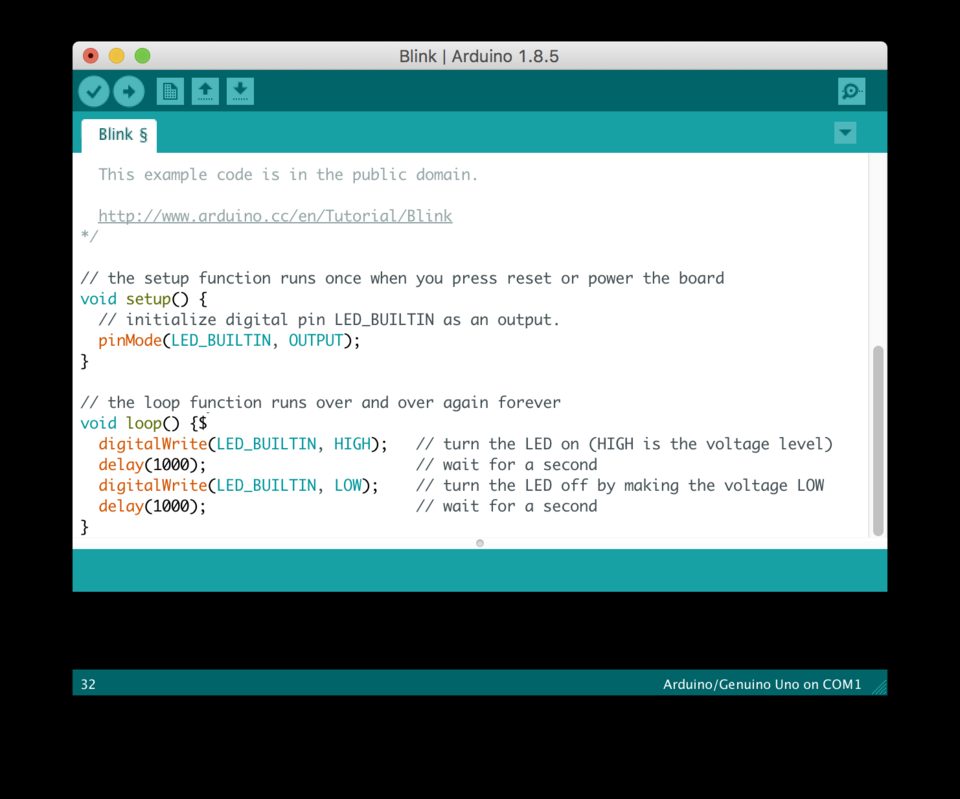
- The editor shows the exact Blink code above, with
setup()andloop(). - The status bar (bottom right) names the selected board and port, here an UNO on a COM port. That is the evidence that step 1 was done correctly.
- Verify compiles; Upload compiles and flashes. A successful upload ends with “Done uploading”.
Limits and redesign
- Debouncing: the 200 ms delay hides bounce by accident. A real debounce accepts a new button state only after it has been stable for, say, 20 to 50 ms, tracked with
millis(). - Non-blocking blink: replace both delays with a
millis()check so the board can also read inputs while blinking.
Say this in the viva
Viva questions
Why
Why compare with '1' and not 1?
The Serial Monitor sends characters. The key 1 arrives as the byte 49, the ASCII code for '1'.
Why is there a return in loop()?
To end the pass early when the button is pressed, which skips the serial check and gives the button priority.
Why a pull-down resistor?
A button only connects or disconnects. Without the resistor, the released state leaves the input floating, and it reads random values.
Why 9600 baud?
A common default that is reliable on any USB serial adapter. Both ends must agree; any standard rate works if they match.
What if
What if you remove pinMode(LED_BUILTIN, OUTPUT)?
The pin stays an input. On AVR, writing HIGH to an input only enables its internal pull-up, so the LED glows very dimly.
What if you hold the button and type 0?
Nothing happens until release; the byte waits in the buffer. After release, the 0 is read and the LED goes off.
What if you send 200 characters at once?
The receive buffer holds 64 bytes; with this loop draining it quickly that is not a problem, but a slow loop would drop bytes beyond 64.
Design
How would you add a third command, say blink?
Add a case for a new character, and make blinking non-blocking with a mode variable and millis(), so the loop still reads commands while blinking.
How would you make the button toggle the LED instead?
Detect the press edge (previous state LOW, current HIGH), debounce it, and invert a stored ledState on each edge.