Experiment 6: ESP32 Wi-Fi web server
The device becomes a server. The commands are URLs, the transport is TCP over Wi-Fi, and the user interface is an HTML page the device generates itself. This is the model behind router admin pages and many cheap smart plugs.
Objective
- Problem
- Control an LED from any browser on the same Wi-Fi network.
- Interface
- three routes:
/on,/off,/blink(5 blinks of 300 ms on, 300 ms off). Any request returns the control page. - Learn
- station mode and DHCP, client-server over TCP, the HTTP request/response format, and the cost of blocking in a server.
System
Design decisions
Station mode (join the router)
- Why
- The ESP32 and the phone share the existing network; the phone keeps its internet connection.
- Alternative
- Access-point mode (
WiFi.softAP()): the ESP32 creates its own network, typically at 192.168.4.1. - Switch when
- No router available, or first-time setup before Wi-Fi credentials are known.
Raw WiFiServer with hand parsing
- Why
- Shows HTTP as it really is: text over a TCP socket, read character by character until the blank line.
- Alternative
- The
WebServerlibrary (server.on("/on", handler)) or an asynchronous web server. - Switch when
- Any real project: routing, headers and concurrency are handled for you.
Commands as GET paths
- Why
- A button can be a plain link, so the page needs no JavaScript.
- Alternative
- POST requests or a small JSON API called from JavaScript.
- Switch when
- For state-changing actions, POST is the correct HTTP method: browsers and proxies may pre-fetch or cache GET.
Close the connection, then blink
- Why
- Blinking takes 3 s (5 × 600 ms). Replying and closing first lets the page load immediately.
- Alternative
- Non-blocking blink driven by
millis()while the server keeps serving. - Switch when
- Whenever a long action must not freeze the server.
HTML generated inside the sketch
- Why
- One file, nothing to upload separately.
- Alternative
- Store HTML/CSS/JS in the ESP32’s flash filesystem (LittleFS) and serve files.
- Switch when
- The page grows beyond a few lines.
What we did
Wired an LED to GPIO 23 through 220 Ω.
The output under control.
Put the network name and password into the sketch and uploaded it.
WiFi.begin()needs credentials; they are compiled into the firmware.Opened the Serial Monitor at 115200 and noted the IP address.
The router assigns the address by DHCP; the sketch prints it because nothing else tells you what it is.
Connected the phone to the same network and opened the IP address in a browser.
The IP address is private to the LAN; from another network it is unreachable.
Pressed TURN ON, TURN OFF and BLINK 5 TIMES.
Each press is a separate HTTP request to a different path.
HTTP on the wire
| Browser sends | Meaning |
|---|---|
GET /on HTTP/1.1 | request line: method, path, version |
Host: 192.168.x.x and other headers | one Name: value per line, each ended by CR LF |
| an empty line | end of headers; GET has no body, so the request is complete |
| ESP32 replies | Meaning |
|---|---|
HTTP/1.1 200 OK | status line: success |
Content-type:text/html | how to interpret the body |
Connection: close | the server closes the TCP connection after the body |
| an empty line, then the HTML | headers end, body follows |
Reading the code
- setup(): configure the pin, join Wi-Fi (blocking until connected), print the IP, start listening.
- loop(): if a client has connected, read its request a character at a time, building the full request and the current line. When an empty line arrives, decide by path, send the response, break out, close, and only then run the blink if requested.
- State per request:
request(everything received),currentLine(the line being read),doBlink(a deferred action).
Wi-Fi web server
#include <WiFi.h> const char* ssid = "YOUR_SSID";const char* password = "YOUR_PASSWORD"; WiFiServer server(80);const int ledPin = 23; // Blink settingsconst int BLINK_COUNT = 5; // how many times to blinkconst int BLINK_ON_MS = 300; // LED on durationconst int BLINK_OFF_MS = 300; // LED off duration // Blinks the LED the given number of timesvoid blinkLED(int times) { for (int i = 0; i < times; i++) { digitalWrite(ledPin, HIGH); delay(BLINK_ON_MS); digitalWrite(ledPin, LOW); delay(BLINK_OFF_MS); }} void setup() { Serial.begin(115200); pinMode(ledPin, OUTPUT); digitalWrite(ledPin, LOW); Serial.print("Connecting to "); Serial.println(ssid); WiFi.begin(ssid, password); while (WiFi.status() != WL_CONNECTED) { delay(500); Serial.print("."); } Serial.println(""); Serial.println("WiFi connected."); Serial.print("IP address: "); Serial.println(WiFi.localIP()); Serial.println("Open this IP in your phone/PC browser."); server.begin();} void loop() { WiFiClient client = server.available(); if (client) { String currentLine = ""; String request = ""; bool doBlink = false; // set true if /blink was requested while (client.connected()) { if (client.available()) { char c = client.read(); request += c; if (c == '\n') { if (currentLine.length() == 0) { // ---- Blank line = end of HTTP request headers ---- if (request.indexOf("GET /blink") >= 0) { doBlink = true; // blink AFTER replying } else if (request.indexOf("GET /on") >= 0) { digitalWrite(ledPin, HIGH); } else if (request.indexOf("GET /off") >= 0) { digitalWrite(ledPin, LOW); } // ---- Send the web page ---- client.println("HTTP/1.1 200 OK"); client.println("Content-type:text/html"); client.println("Connection: close"); client.println(); client.println("<!DOCTYPE html><html>"); client.println("<head><meta name=\"viewport\" content=\"width=device-width, initial-scale=1\">"); client.println("<title>ESP32 LED</title></head>"); client.println("<body style=\"font-family:Arial;text-align:center;\">"); client.println("<h1>ESP32 WiFi LED Control</h1>"); client.println("<p><a href=\"/blink\"><button style=\"padding:15px 30px;font-size:20px;\">BLINK 5 TIMES</button></a></p>"); client.println("<p><a href=\"/on\"><button>TURN ON</button></a></p>"); client.println("<p><a href=\"/off\"><button>TURN OFF</button></a></p>"); client.println("</body></html>"); break; } else { currentLine = ""; } } else if (c != '\r') { currentLine += c; } } } client.stop(); // close connection FIRST so the browser is not kept waiting if (doBlink) { Serial.println("Blinking 5 times..."); blinkLED(BLINK_COUNT); Serial.println("Blink done."); } }}- Line 1ESP32 Wi-Fi: association, DHCP, and TCP sockets through the lwIP stack.
- Lines 3 to 4Credentials (placeholders in your file).
- Line 6A TCP listener on port 80, the HTTP default.
- Line 7The controlled output.
- Lines 11 to 13Blink parameters as named constants.
- Line 16A blocking helper:
times× (300 + 300) ms. - Line 32Start association with the router.
- Lines 33 to 35Busy-wait until connected, printing progress. With wrong credentials this never exits.
- Line 41The DHCP-assigned address to type into the browser.
- Line 44Start accepting connections.
- Line 48Returns a connected client if one is waiting, otherwise an empty object, so loop() keeps polling. (Newer ESP32 cores rename this to
accept().) - Lines 51 to 53Per-request parser state.
- Lines 55 to 58Read one byte at a time and append it to the full request.
- Lines 60 to 61A newline while
currentLineis empty means CR LF CR LF: the blank line ending the headers. - Lines 64 to 69Route by substring.
indexOfreturns −1 if absent./blinkonly sets a flag;/onand/offact immediately. - Lines 73 to 76Status line, headers, and the blank line that separates them from the body.
- Lines 78 to 86The body: a page whose three buttons are wrapped in links, so tapping one makes the browser request that path.
- Line 88Response complete; leave the read loop.
- Lines 89 to 90A non-empty line ended: start the next one.
- Lines 92 to 93Accumulate characters except CR.
- Line 98Close the TCP connection so the browser finishes loading.
- Lines 100 to 103The deferred 3-second blink, after the client is gone.
Reading the outputs
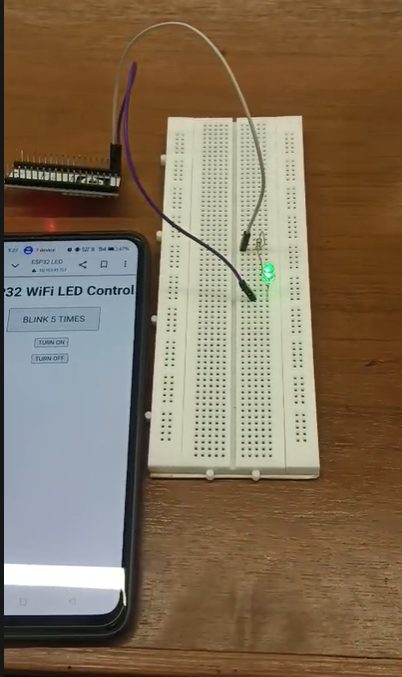
- The phone browser shows the generated page: heading “ESP32 WiFi LED Control” and the three buttons from the HTML in the code.
- The address bar shows a private IP address: the request went over the local network.
- The LED on the breadboard is lit after TURN ON: the
/onroute executeddigitalWrite(23, HIGH).
Limits and redesign
- No security: plain HTTP, no login. Anyone on the network can control it.
- Only reachable on the LAN: behind NAT, nothing outside can open a connection to it. (This is exactly what Exp 8 solves.)
- One client at a time, blocking: during the 3 s blink, or a slow client, no other request is served.
- Fragile parsing: substring matching, no handling of slow or malformed requests, the whole request kept in a growing String.
- Browsers also request /favicon.ico: it matches no route, so the page is just sent again; harmless here.
- Redesign: WebServer or an async server, POST for actions, authentication, non-blocking blink, and for remote access a cloud or MQTT broker.
Say this in the viva
Viva questions
Why
Why does the code look for an empty line?
In HTTP the headers end with an empty line (CR LF CR LF). After it, a GET request is complete, so the server can respond.
Why can’t you open this page from mobile data?
The IP address is private to the LAN, and the router’s NAT does not forward incoming connections to the ESP32.
Why close the client before blinking?
Blinking blocks for 3 s; replying and closing first lets the browser finish loading at once.
What if
What if two phones press buttons at the same time?
The server handles one client at a time; the second waits until the first is closed, and during a blink both wait.
What if the router reboots and gives a new IP?
The old address stops working. Fixes: a DHCP reservation on the router, a static IP, or mDNS (for example esp32.local).
Design
How would you make this safe on a shared network?
Require authentication, use POST for actions, and ideally HTTPS; or do not expose a server at all and use a broker.
How would you show the LED’s current state on the page?
Track a state variable and insert it into the HTML on every response, or add a /state route returning JSON that the page polls.