Experiment 5: Bluetooth LED control
Experiment 1’s protocol (one ASCII byte per command, a text reply) moved from a USB cable to a radio link. The code barely changes; what changes is the transport, and with it range, pairing and security.
Objective
- Problem
- Switch an LED from a smartphone without a cable.
- Input
- bytes received over Bluetooth from a paired phone.
- Output
- LED on GPIO 2; an acknowledgement string sent back to the phone.
- Protocol
1→ LED on, reply “LED turned ON”;0→ LED off, reply “LED turned OFF”; anything else ignored.
System
Design decisions
ESP32’s built-in Bluetooth instead of an HC-05 module
- Why
- No extra hardware, no UART wiring, no 5 V to 3.3 V divider, and the device name is set in code.
- Alternative
- Arduino UNO + HC-05 on a serial port (SoftwareSerial), with a divider on the HC-05 RX.
- Switch when
- When the main board has no radio (any AVR Arduino).
Bluetooth Classic SPP, not BLE
- Why
- SPP makes the link look like a serial port, so the code is
SerialBT.read()/println(), identical in shape toSerial. Android terminal apps support it directly. - Alternative
- BLE: define a GATT service with a writable characteristic for commands and a notify characteristic for replies.
- Switch when
- Battery devices, iPhones (iOS does not expose Classic SPP to ordinary apps), or newer chips like ESP32-S3/C3 that only have BLE.
Reply after every command
- Why
- An acknowledgement tells the user the command was received and executed, not just sent.
- Alternative
- No reply (fire and forget), or report full state on request.
- Switch when
- Always keep some acknowledgement when the user cannot see the device.
Polling SerialBT.available() with a 20 ms delay
- Why
- Simple; 20 ms adds at most 20 ms latency and keeps the loop from spinning needlessly.
- Alternative
- Register a data callback with the library.
- Switch when
- When the loop has other work and you want event-driven handling.
What we did
Connected the ESP32, selected the ESP32 board and port, uploaded the sketch (holding BOOT if it stuck at “Connecting…”).
BOOT forces the ESP32 into its serial bootloader on boards whose auto-reset circuit does not.
Opened the Serial Monitor at 115200 and saw the start message.
Confirms Bluetooth started without errors.
Paired the phone with the device name from Bluetooth settings.
Pairing exchanges keys once; afterwards the phone can open the SPP channel.
Opened a Bluetooth serial terminal app, connected, and sent 1 and 0.
The app plays the role the Serial Monitor played in Exp 1.
How the link works
- Radio: 2.4 GHz ISM band; Classic Bluetooth hops across 79 channels of 1 MHz up to 1600 times a second, which survives interference from Wi-Fi sharing the band.
- Piconet: one master, up to 7 active slaves. The phone is master; the ESP32 is a slave.
- Pairing establishes a shared key; later connections are authenticated and encrypted with it.
- RFCOMM emulates a serial cable over L2CAP; SPP is the profile that says “this is a serial port”. Your code sees a byte stream, exactly like UART.
- Range is about 10 m for typical phones and modules.
Reading the code
- Two serial ports:
Serialis USB to the PC (status only);SerialBTis the Bluetooth channel (commands in, replies out). - State: none beyond the pin level. Each byte is handled independently.
- Control flow: if a byte is waiting, read one, compare, act, reply; then wait 20 ms.
Bluetooth LED control
#include <BluetoothSerial.h> BluetoothSerial SerialBT; void setup() { Serial.begin(115200); SerialBT.begin("ESP32_TG"); // Name of your Bluetooth device pinMode(2, OUTPUT); // Set GPIO 2 as an output pin Serial.println("The device started, now you can pair it with bluetooth!");} void loop() { if (SerialBT.available()) { char incomingChar = SerialBT.read(); if (incomingChar == '1') { digitalWrite(2, HIGH); // Turn LED ON SerialBT.println("LED turned ON"); } else if (incomingChar == '0') { digitalWrite(2, LOW); // Turn LED OFF SerialBT.println("LED turned OFF"); } } delay(20);}- Line 1Part of the ESP32 Arduino core: a Stream-like wrapper over the Classic Bluetooth SPP stack.
- Line 3The Bluetooth serial port object.
- Line 6USB serial for logs.
- Line 7Initialises the Bluetooth controller and stack, registers the SPP service, and makes the device discoverable as “ESP32_TG”.
- Line 8GPIO 2 drives the LED (on many DevKit boards it is also the on-board LED).
- Line 9Status to the PC.
- Line 13Non-zero when bytes have arrived from the phone.
- Line 14Take one byte from the receive buffer.
- Lines 16 to 18Command
1: drive HIGH, acknowledge over Bluetooth. - Lines 20 to 22Command
0: drive LOW, acknowledge. Newlines the app may append are ignored. - Line 25Pace the loop.
Reading the outputs
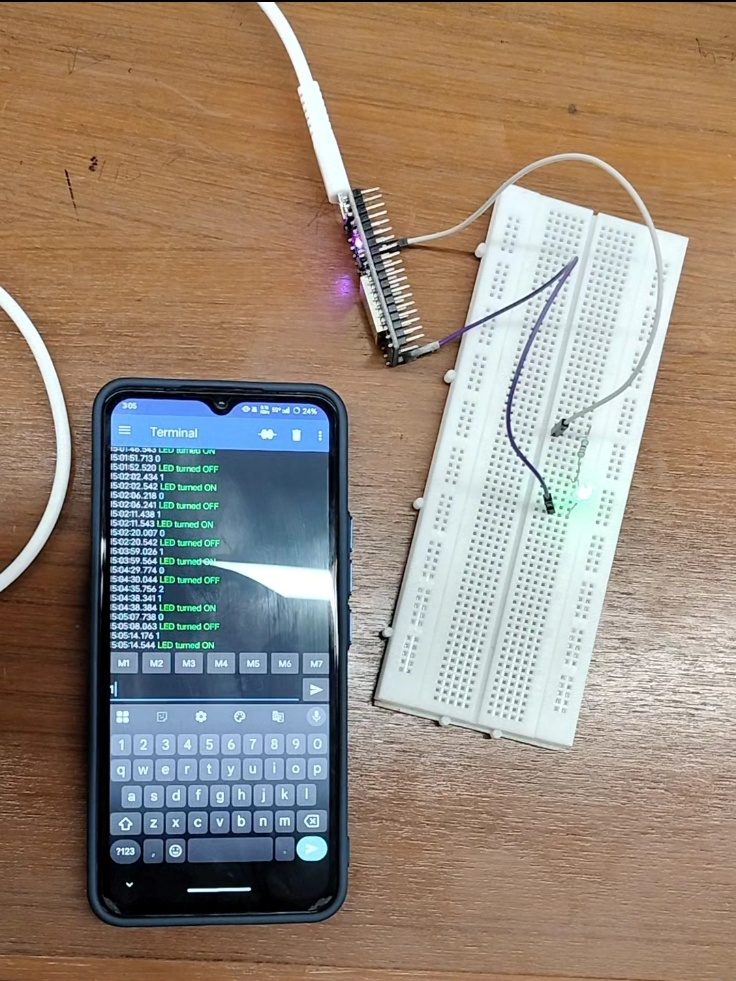
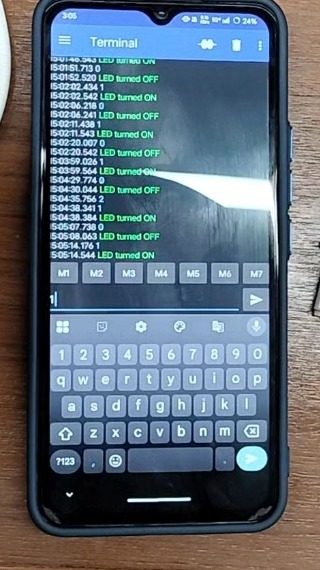
- Bench photo: the ESP32 board (top left) with jumpers to the breadboard, where the LED is lit; the phone beside it runs the terminal app.
- Terminal: timestamped lines alternate between the sent command (
1or0) and the replyLED turned ON/LED turned OFF. A reply after each command proves the round trip: phone → ESP32 → pin → reply → phone.
Limits and redesign
- Security: anyone who can pair can send commands. A real product adds an application-level secret or uses BLE with secure pairing and bonding.
- One controller at a time: SPP is a point-to-point channel.
- Portability:
BluetoothSerialneeds Bluetooth Classic, available on the original ESP32 only. - Redesign for production: BLE GATT service with a “LED state” characteristic (write to set, notify on change), which works on iOS and Android and costs far less power.
Say this in the viva
Viva questions
Why
Why use SerialBT and Serial together?
Serial is the USB link to the PC for logs; SerialBT is the Bluetooth link to the phone for commands and replies.
Why does this not work on an iPhone app?
iOS does not let ordinary apps use Bluetooth Classic SPP; iPhone apps talk to custom devices over BLE.
Why does Bluetooth hop frequencies?
To spread transmissions across the band, so interference on one channel only affects some packets, which are retransmitted.
What if
What if two phones try to connect?
SPP is point to point; the second connection is refused while the first is active.
What if you flash this code to an ESP32-C3?
It fails: the C3 has BLE only, and BluetoothSerial needs Classic.
Design
Redesign this for a battery-powered door sensor.
BLE instead of Classic: advertise, expose a GATT characteristic with notify for state changes, sleep between events, and use bonding for security.
When would you choose Bluetooth over Wi-Fi?
Phone-to-device control nearby, no router available, lower power (especially BLE), or initial setup before Wi-Fi credentials exist.