Experiment 4: DHT and photosensitive sensors
Two ways a sensor can hand data to a controller: a smart sensor that measures, calibrates and sends a checked digital frame (DHT22), and a dumb sensor whose analog value is reduced to one bit by a comparator before the controller sees it (LDR module).
Objective
- DHT22
- Read temperature and relative humidity every 2 s, print them, and turn an LED on if humidity drops below 20 %.
- LDR
- Switch an LED automatically from the ambient light level.
- Learn
- digital sensor protocols, validating readings, and moving a decision (threshold) into hardware.
System
| DHT22 | LDR module | |
|---|---|---|
| What arrives at the pin | a 40-bit frame: 16 bits humidity, 16 temperature, 8 checksum | one bit: above or below a threshold |
| Calibration | done at the factory, stored in the sensor | none; threshold set by hand with a trimmer |
| Where the threshold lives | in your code (h < 20) | in hardware (the trimmer), the code only reads the result |
| Failure mode | a read can fail: the library returns NaN | cannot fail in software; wrong trimmer setting means it never switches |
| Cost in code | a library and an error path | one digitalRead() |
Design decisions
DHT22 instead of DHT11
- Why
- Wider range (0 to 100 %RH, −40 to 80 °C), better accuracy (about ±2 %RH, ±0.5 °C) and 0.1 resolution.
- Alternative
- DHT11 (cheaper, 20 to 90 %RH, 0 to 50 °C, ±2 °C, 1-unit resolution); or an I²C sensor such as SHT31 or BME280.
- Switch when
- I²C sensors when you need speed, several sensors on one bus, or better accuracy; DHT11 when cost is all that matters.
Use a library for the DHT protocol
- Why
- The protocol encodes bits in pulse widths of tens of microseconds; the library does the timing, the decode and the checksum.
- Alternative
- Write the bit-timing code yourself with
micros(). - Switch when
- Only to learn it, or on a platform without the library.
Check isnan() and skip the pass on failure
- Why
- A failed read returns NaN. Without the check you would print “nan” and compare NaN with 20 (always false), silently treating a fault as “humidity fine”.
- Alternative
- Retry immediately, or count consecutive failures and raise an error state.
- Switch when
- Any unattended device: a sensor that keeps failing should be reported, not just skipped.
2 s between readings
- Why
- The DHT22 cannot be sampled faster than about once every 2 s; faster reads return stale data or fail.
- Alternative
- A non-blocking schedule with
millis()instead ofdelay(2000). - Switch when
- When the board must do anything else.
LDR module’s digital output (DO)
- Why
- The comparator turns light into a clean bit at a threshold you set with the trimmer. No ADC, no calibration code.
- Alternative
- The analog output (AO) into
analogRead()and a threshold in software. - Switch when
- You need the actual light level, several thresholds, or a threshold changed remotely.
What we did
Installed the DHT sensor library (and Adafruit Unified Sensor, which it depends on).
The sketch includes
DHT.h; without the library it does not compile.Wired the DHT22: VCC, GND, DATA to GPIO 27; LED via 220 Ω to GPIO 2.
DATA is bidirectional: the ESP32 sends the start signal and then listens on the same wire.
Uploaded, opened the Serial Monitor at 115200, and watched readings every 2 s.
Confirms the protocol works and the values are plausible.
Wired the LDR module: VCC, GND, DO to GPIO 26; LED on GPIO 2.
DO is the comparator output; AO is left unconnected because only the bit is used.
Covered and uncovered the sensor; adjusted the trimmer.
Finds the switching point and the module’s polarity (which level means bright).
DHT22: protocol, circuit, code
Checksum: the last byte must equal the low 8 bits of the sum of the first four. If it does not, the frame was corrupted and the library returns NaN. That is the same idea as a checksum on a network packet: detect corruption, do not use the data.
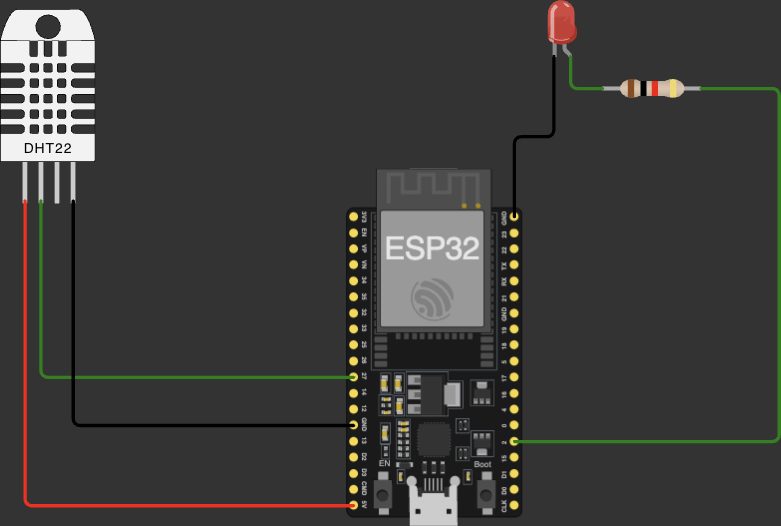
- DHT22 pins: VCC (red), DATA (green, to GPIO 27), GND (black). The fourth pin is unused.
- LED: from GPIO 2 through the resistor, back to GND.
DHT22 with humidity alert LED
#include <DHT.h> #define dhtPin 27#define DHTTYPE DHT22#define ledPin 2 DHT dht(dhtPin, DHTTYPE); void setup() { Serial.begin(115200); dht.begin(); pinMode(ledPin, OUTPUT);} void loop() { float h = dht.readHumidity(); float temp = dht.readTemperature(); // Check if sensor reading failed if (isnan(h) || isnan(temp)) { Serial.println("Failed to read from DHT sensor!"); return; } Serial.print("Humidity: "); Serial.print(h); Serial.println(" %"); Serial.print("Temperature: "); Serial.print(temp); Serial.println(" °C"); // Turn LED ON if humidity is below 20% if (h < 20) { digitalWrite(ledPin, HIGH); } else { digitalWrite(ledPin, LOW); } delay(2000);}- Line 1The DHT library.
- Lines 3 to 5Compile-time constants.
DHTTYPEtells the library which frame format to decode; DHT11 and DHT22 encode values differently. - Line 7A sensor object bound to the pin and model.
- Line 12Sets the pin’s idle state for the protocol.
- Lines 19 to 20Each call may trigger a read of the full 40-bit frame (the library caches within 2 s). Temperature is °C by default.
- Lines 23 to 25Validation: a failed read is NaN. Report it and end the pass so no invalid value reaches the decision below. Note this path skips
delay(2000), so it retries immediately. - Lines 28 to 34Output.
Serial.print(float)shows 2 decimals by default. - Lines 37 to 39The edge decision: humidity below 20 % (very dry) lights the LED.
- Line 43Respect the sensor’s minimum interval.
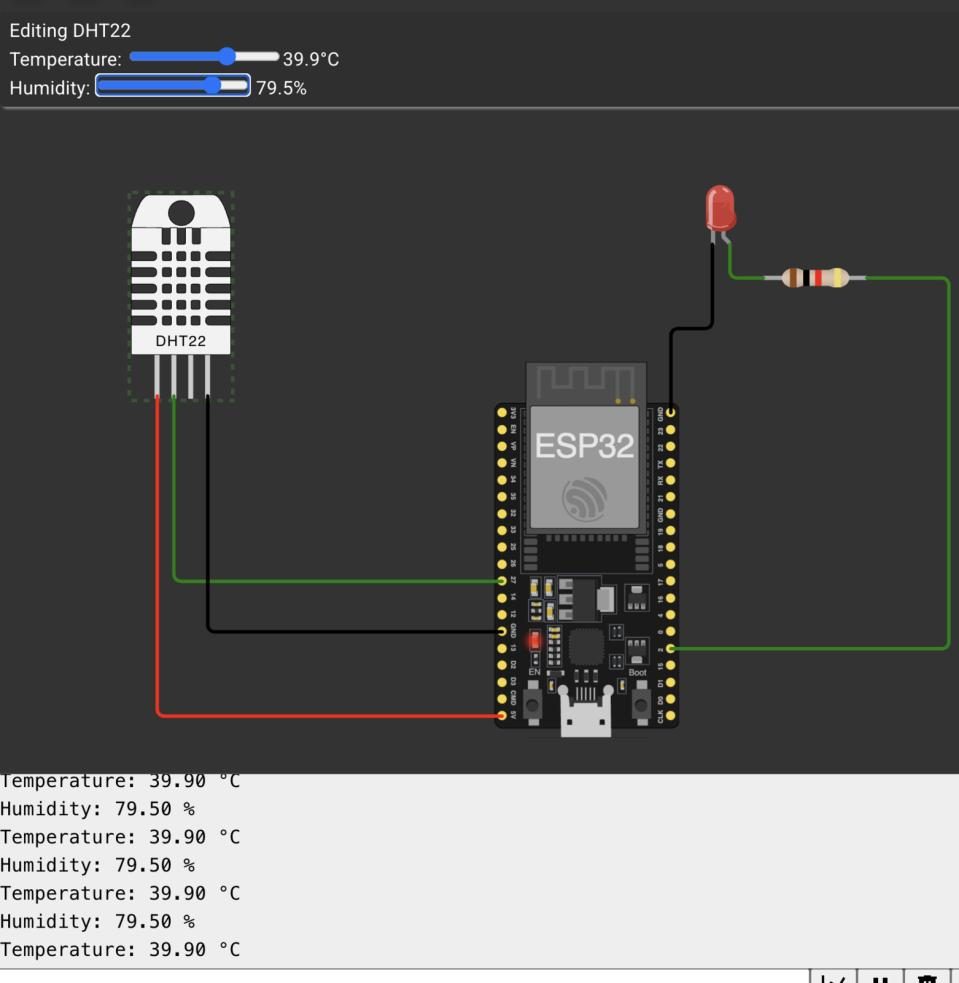
- The simulator’s DHT22 is set to 39.9 °C and 79.5 % (sliders at the top).
- The log prints
Temperature: 39.90 °CandHumidity: 79.50 %repeatedly: values decoded correctly, two decimals fromSerial.print. - The LED is off: 79.5 is not below 20, so the decision branch is correct.
LDR: module, circuit, code
The comparator outputs one level when the divider voltage is above the trimmer voltage and the other when below. Which level means “bright” depends on how the module is wired, so you determine it by experiment: on this module, bright gives DO = 0.
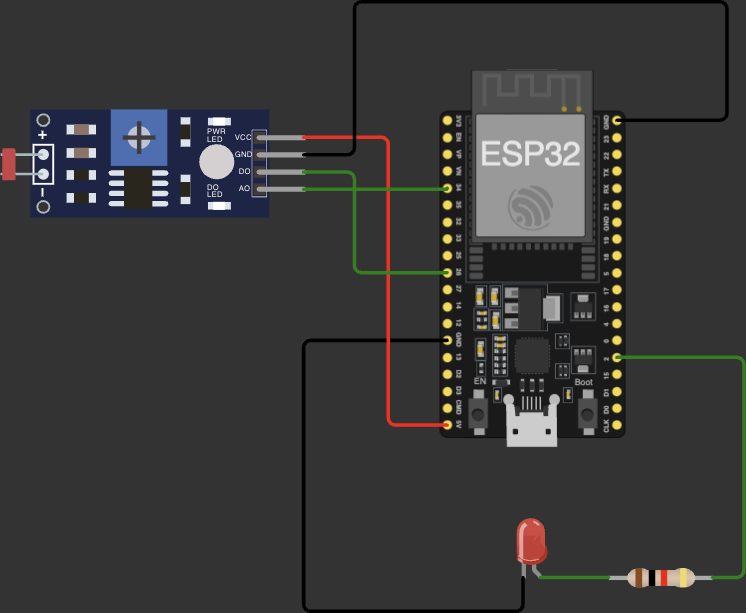
- Module pins: VCC, GND, DO (to GPIO 26), AO (unconnected).
- LED from GPIO 2 via resistor to GND.
LDR module switching an LED
int ldrPin = 26;int ledPin = 2; void setup() { Serial.begin(115200); pinMode(ldrPin, INPUT); pinMode(ledPin, OUTPUT);} void loop() { int ldrVal = digitalRead(ldrPin); Serial.println(ldrVal); if (ldrVal == LOW) { digitalWrite(ledPin, HIGH); } else { digitalWrite(ledPin, LOW); } delay(1000);}- Lines 1 to 2Comparator output in, LED out.
- Lines 7 to 8DO is actively driven by the module, so no pull resistor.
- Lines 13 to 15Read and log the bit.
- Lines 17 to 18DO LOW means bright on this module, so the LED lights in bright light.
- Lines 20 to 21Dark: LED off.
- Line 24Poll once a second; ambient light changes slowly.
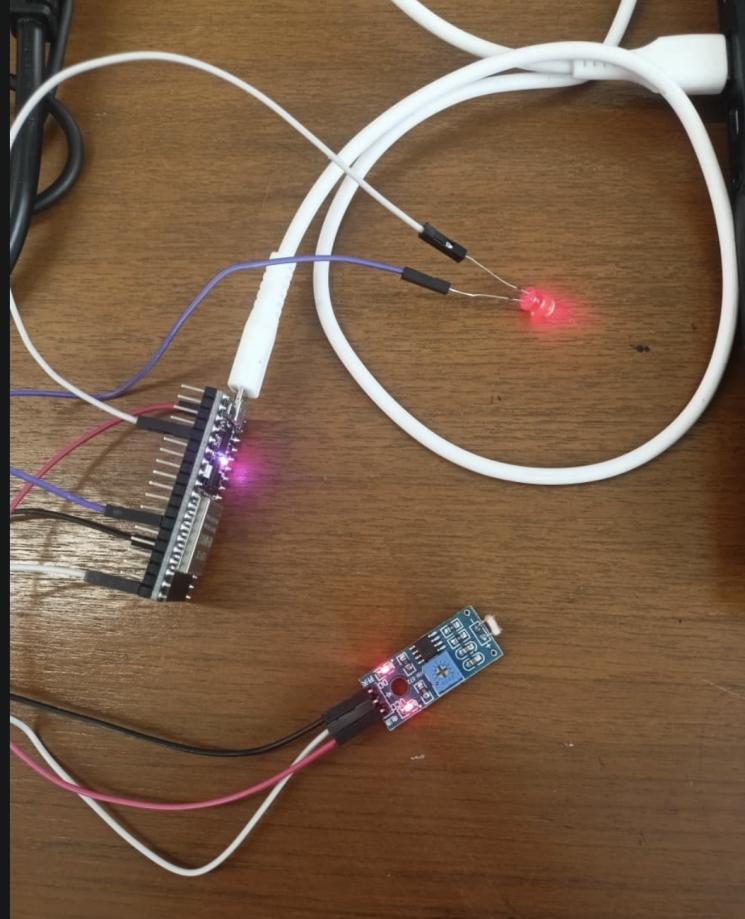
- The module (blue board with the trimmer and the LDR at its tip) wired to the ESP32; the external LED is lit.
- The module’s own indicator LEDs (power and DO state) are visible on its board.
Limits and redesign
- Comparator chatter: near the threshold the bit flips back and forth. Require N equal readings, or use AO with two software thresholds (hysteresis).
- DHT failure path: on a read failure the loop retries with no delay, hammering the sensor. Add a short delay and a failure counter.
- 20 % humidity threshold is very dry air and never triggers indoors; choose a threshold from the application (for example over 70 % for a damp alarm).
Say this in the viva
Viva questions
Why
Why check isnan() before using the values?
A failed read returns NaN. NaN compared with anything is false, so without the check a fault would look like normal humidity and could hide a broken sensor.
Why not read the DHT22 every 100 ms?
Its measurement needs about 2 s; faster reads return the previous value or fail.
Why does the LDR module need a comparator?
The LDR only changes resistance. The divider turns that into a voltage and the comparator turns the voltage into a clean digital level at an adjustable threshold.
What if
What if DHTTYPE is set to DHT11 for a DHT22?
The frame is decoded with the wrong format, giving wrong values.
What if you need the actual light level in lux?
Use AO with analogRead() and calibrate against a light meter, or use a digital light sensor (for example BH1750 over I²C).
What if the DHT data wire is long and readings fail?
Signal integrity: use a stronger pull-up, shorter or shielded wire, or an I²C or RS-485 based sensor designed for longer cable runs.
Design
Design a greenhouse controller from these parts.
DHT22 for temperature and humidity, decisions at the edge (fan via MOSFET or relay above a temperature, with hysteresis), readings sent to a cloud dashboard (Exp 8) for history and remote overrides.
Smart sensor or dumb sensor with comparator: how do you choose?
Smart sensors give calibrated, validated values but need a protocol and time. Comparator modules give an instant bit with no code, but no value and no validation.