Experiment 7: GSM module, SMS and calls
A modem is a peripheral you control with a text protocol. The Arduino sends lines like AT+CMGS=... and reads replies. The hard parts are not the code but the physical layer: power bursts, logic levels, and whether a 2G network exists at all.
Objective
- Problem
- Communicate where there is no Wi-Fi: send an SMS, receive SMS, and place a voice call from a microcontroller.
- Interface
- type
s,rorcin the Serial Monitor; the Arduino translates each into AT commands for the module. - Learn
- command/response protocols, a second serial port in software, and the power and level constraints of radio modules.
System
Design decisions
GSM (2G) module
- Why
- SMS and voice work anywhere with mobile coverage, with no router or internet. Cheap modules (SIM800L, SIM900A) are common in labs.
- Alternative
- Wi-Fi (Exp 6/8), LoRa, or newer cellular modules (LTE-M / NB-IoT).
- Switch when
- Where 2G has been switched off, or for low-power data, use LTE-M or NB-IoT modules.
SoftwareSerial on pins 10 and 11
- Why
- The Uno has one hardware UART, already used by USB for upload and the Serial Monitor. SoftwareSerial creates a second one on ordinary pins.
- Alternative
- A board with spare hardware UARTs (MEGA’s Serial1, ESP32’s Serial2).
- Switch when
- Always prefer a hardware UART if available: SoftwareSerial is timed by the CPU, uses interrupts, and gets unreliable at higher speeds.
SMS text mode (AT+CMGF=1)
- Why
- You send the message as readable text.
- Alternative
- PDU mode: the raw encoded SMS in hex.
- Switch when
- PDU when you need Unicode messages, binary SMS or full control of encoding.
Forward new SMS straight to serial (AT+CNMI=2,2,0,0,0)
- Why
- Each incoming message is pushed out of the serial port as it arrives, and the loop’s pass-through prints it. No storage management.
- Alternative
- Store messages on the SIM (notification
+CMTI) and read them withAT+CMGR, delete withAT+CMGD. - Switch when
- When the Arduino may be busy or offline and must not lose messages.
Module on its own supply, common ground
- Why
- GSM transmit bursts draw up to about 2 A; a USB-powered board cannot supply that.
- Alternative
- A large capacitor near the module helps with short bursts but does not replace a proper supply.
- Switch when
- Always for SIM800L/SIM900-class modules.
Fixed delays between commands
- Why
- Simple: send, wait a little, send the next.
- Alternative
- Wait for the expected reply (
OK,>) with a timeout before sending the next command. - Switch when
- Any reliable product: networks respond at variable speed, and fixed delays fail silently.
What we did
Inserted an active 2G-capable SIM.
Without a SIM and a 2G network the module can never register.
Wired module TX → Arduino pin 10, Arduino pin 11 → module RX (through a 1 kΩ / 2 kΩ divider for the SIM800L), common GND.
Pin 10 is the software port’s receive pin. The divider brings 5 V logic down to the module’s 3.3 V-level input.
Powered the module from an external supply able to deliver 2 A.
Prevents brown-outs during transmission, the most common cause of “it never registers”.
Put the recipient number (with +91) into the sketch and uploaded.
AT+CMGS and ATD need the full international number.
Waited for the network LED to change from fast to slow blinking.
Slow blinking (about every 3 s) means registered on the network; before that, commands that use the network fail.
Opened the Serial Monitor at 9600 and sent s, r and c.
Exercises send, receive and call.
AT commands
| Command | Purpose | Typical reply |
|---|---|---|
AT | link check | OK |
AT+CPIN? | SIM ready? | +CPIN: READY |
AT+CSQ | signal quality (0 to 31, 99 unknown) | +CSQ: 18,0 |
AT+CREG? | network registration | +CREG: 0,1 home, 0,5 roaming, 0,2 searching |
AT+CMGF=1 | SMS text mode | OK |
AT+CMGS="+91…" | start an SMS | > prompt; then text, end with Ctrl+Z (byte 26) |
AT+CNMI=2,2,0,0,0 | push new SMS to serial | later +CMT: … with the message |
ATD+91…; | voice call (the ; means voice) | OK |
ATA / ATH | answer / hang up | OK |
Wiring and power
| Module pin | Connects to | Why |
|---|---|---|
| TX | Arduino pin 10 | module transmits, Arduino software port receives |
| RX | Arduino pin 11 via divider | Arduino transmits; divider protects the module’s 3.3 V-level input |
| GND | Arduino GND and supply GND | one shared reference for the serial signals |
| VCC | external supply | SIM800L: 3.4 to 4.4 V, up to ~2 A peaks |
Reading the code
- Two links:
Serial(PC, 9600) andsim(modem, 9600, software). - loop() does two things every pass: dispatch one menu character from the PC, and copy any byte from the modem to the PC. The second part is a transparent relay, which is how all modem replies and incoming messages become visible.
- Each action is a fixed sequence of AT lines with short delays, not a conversation that checks replies.
GSM: send, receive, call
#include<SoftwareSerial.h>#define Tx 10#define Rx 11 SoftwareSerial sim (Tx,Rx); int timeout;String buffr;String number = "+91XXXXXXXXXX"; void setup() { // put your setup code here, to run once: Serial.begin(9600); buffr.reserve(50); Serial.println("System Started"); sim.begin(9600); delay(1000); Serial.println("Type s to send msg, r to recieve msg, c to make a call"); } void loop() { // put your main code here, to run repeatedly: if(Serial.available()>0){ switch(Serial.read()) { case 's': sendMessage(); break; case 'r': recieveMessage(); break; case 'c': callNumber(); break; } } if (sim.available()>0){ Serial.write(sim.read()); }}void sendMessage(){ Serial.println("Sending message: "); sim.println("AT+CMGF=1"); //set the GSM modul in text mode sim.println("AT+CMGS=\"" + number + "\"\r"); delay(200); String sms = "Hello from the IoT lab GSM module"; sim.println(sms); delay(100); sim.println((char)26); //ASCII code of ctrl+Z delay(200); buffr=readSerial();} void recieveMessage(){ Serial.println("SIM800L read an SMS"); sim.println("AT+CMGF=1"); delay(200); sim.println("AT+CNMI=2,2,0,0,0"); //AT command to read live msg delay(200); Serial.write("Unread msg done");} String readSerial(){ timeout=0; while(!sim.available() && timeout < 12000){ delay(13); timeout++; } if (sim.available()){ return sim.readString(); }} void callNumber(){ sim.print(F("ATD")); sim.print(number); sim.print(F(";\r\n")); buffr=readSerial(); Serial.println(buffr); }- Line 1A UART implemented by the CPU on ordinary pins.
- Lines 2 to 3Named from the module’s side: pin 10 receives the module’s TX, pin 11 drives the module’s RX.
- Line 5Constructor is
(rxPin, txPin): Arduino RX = 10, TX = 11. - Lines 7 to 9Wait counter, reply buffer, and the target number (masked in your file).
- Lines 13 to 15PC link;
reserve(50)pre-allocates the String to reduce heap fragmentation. - Line 16Modem link at 9600 baud.
- Line 18The menu.
- Lines 24 to 33Dispatch: read one character and call the matching action.
- Lines 38 to 39Relay: one byte from the modem to the PC per pass.
- Lines 42 to 44Text mode.
- Line 45Start the message to
number; the modem will answer with>. - Lines 47 to 48The message body.
- Line 50Ctrl+Z (byte 26) ends and sends the message. ESC (27) would cancel.
- Line 52Collect the reply (
+CMGS: nandOKon success). - Lines 55 to 59Text mode, then route new messages straight to serial; the relay in loop() prints them when they arrive.
- Line 61Only a confirmation that the mode is set; messages arrive later.
- Lines 64 to 71Wait up to 12000 × 13 ms ≈ 156 s for the modem to start replying, then read until the stream goes quiet.
- Lines 75 to 78
ATD<number>;dials a voice call.F()keeps the literal in flash instead of RAM.
Reading the outputs
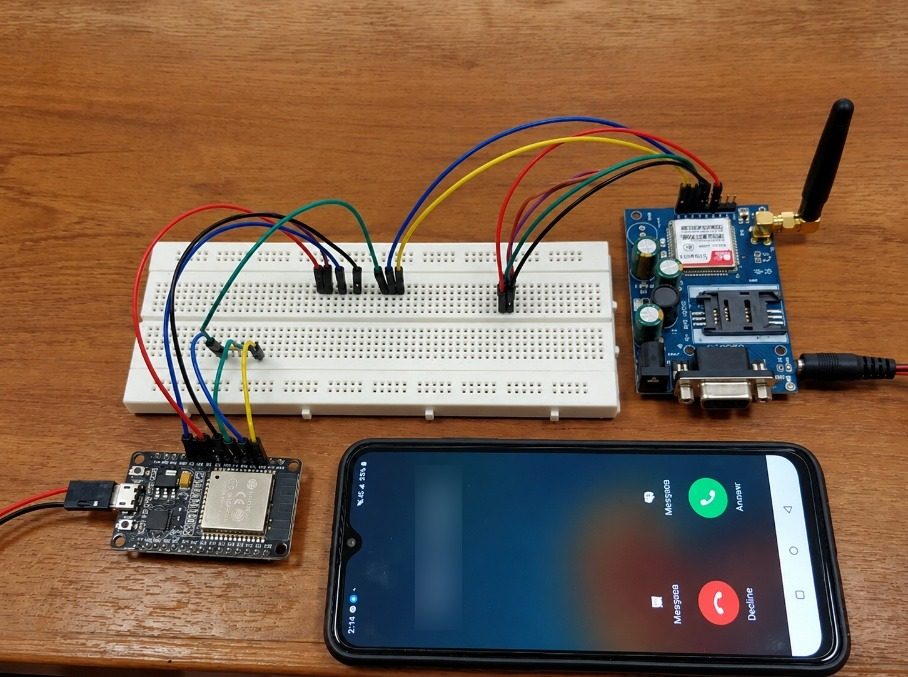
- Right: the GSM module (SIMCom chip, SIM holder, antenna, DB9 serial connector, DC jack for its own supply).
- Centre: breadboard distributing the signal and ground wires.
- Bottom: the target phone showing an incoming call: evidence that
cplaced a call through the network. - Bottom left: the controller board. It is an ESP32, while your code and steps target an Uno; see the note below.
Limits and redesign
- No reply checking: the code never confirms
OKor>; a failed step goes unnoticed. A reliable driver waits for the expected token with a timeout and retries. - Up to 156 s blocked in
readSerial(). - Typos in names (
recieveMessage) work because they are used consistently. - Redesign: hardware UART, a reply-driven state machine or a library such as TinyGSM, and an LTE-M/NB-IoT module where 2G is being retired.
Say this in the viva
Viva questions
Why
Why SoftwareSerial instead of Serial?
Serial (pins 0 and 1) is the Uno’s only hardware UART and is used by USB for uploading and the monitor.
Why Ctrl+Z at the end of an SMS?
In text mode, byte 26 tells the modem the message body is complete and should be sent.
Why an external power supply?
Transmission bursts draw up to about 2 A; the board’s regulator or USB cannot supply that, so the module browns out and resets.
What if
What if the network LED keeps blinking fast?
The module is not registered: no SIM, no 2G coverage or operator support, weak signal, or insufficient power.
What if you remove the voltage divider on RX?
The module’s input sees 5 V logic above its rating; it may work for a while or be damaged.
What if a reply takes longer than the delay?
The next command is sent too early and may be ignored or corrupt the exchange; waiting for the reply token avoids this.
Design
Design a remote alarm for a farm with no Wi-Fi.
Sensor → microcontroller → cellular module (LTE-M or 2G where available) sending SMS on events, battery and solar power sized for transmit bursts, and a reply-checked AT driver with retries.
SMS or cellular data for telemetry?
SMS for rare, human-readable alerts. Cellular data (MQTT over LTE-M/NB-IoT) for regular readings, cheaper per byte and machine-friendly.