Experiment 8: Arduino IoT Cloud
Experiment 6 reversed: the device no longer waits for someone to connect to it. It connects out to a cloud service and keeps that connection open; the dashboard talks to the same cloud. That one change makes it work from anywhere.
Objective
- Problem
- Control an LED from anywhere on the internet, through a dashboard, securely.
- State
- one shared Boolean,
ledPin, kept in sync between the cloud and the board. - Behaviour
- switch ON → GPIO 17 HIGH and “LED ON” on the monitor; OFF → LOW and “LED OFF”.
- Learn
- IoT cloud platforms, the Device/Thing/variable/dashboard model, publish/subscribe over TLS, and event callbacks.
System
Design decisions
A managed IoT cloud
- Why
- It provides the broker, authentication, dashboards, a phone app and code generation, so the device code is a callback and one update call.
- Alternative
- Run your own MQTT broker (for example Mosquitto) and build the dashboard; or AWS IoT Core / Azure IoT Hub for large fleets; ThingSpeak for logging and graphs.
- Switch when
- Own broker when you need control of data, cost at scale, or no vendor dependency; big clouds for fleets and integration.
Device as client, not server
- Why
- An outbound connection works behind NAT and firewalls; nothing on the internet needs to reach into your network.
- Alternative
- Exp 6’s server model plus port forwarding.
- Switch when
- Practically never for internet control; the server model is fine on a LAN.
Shared variable with “on change” updates
- Why
- The state is one Boolean; sending it only when it changes keeps traffic minimal and the dashboard always shows the device’s state.
- Alternative
- Periodic updates every N seconds.
- Switch when
- Sensor readings that change continuously are better sent periodically.
Read and write permission
- Why
- The dashboard must write the value (control) and the device may write it back (report).
- Alternative
- Read-only for values only the device produces (sensor readings).
- Switch when
- Any value the user should not be able to change.
Callback instead of polling
- Why
- The library calls
onLedPinChange()exactly when a new value arrives; the sketch never compares old and new values itself. - Alternative
- Check the variable every loop and act when it differs from the last seen value.
- Switch when
- Polling only if the library offered no callbacks.
What we did
Wired an LED to GPIO 17 through 220 Ω.
The controlled output.
In Devices, added the ESP32 as a third-party device and saved its Device ID and Secret Key.
These are the board’s credentials: the cloud authenticates the TLS connection with them.
In Things, created a Thing, linked the device, and entered Wi-Fi name, password and the Secret Key.
The Thing binds device, network settings and variables; these values go into the generated code.
Added a variable
ledPin: Boolean, Read and Write, update on change.Defines the shared state and generates the callback
onLedPinChange().Put the sketch code in, uploaded, and watched the connection log at 9600 baud.
The debug output shows Wi-Fi connecting, then the cloud connection; failures show where it stopped.
Created a dashboard with a Switch widget linked to
ledPinand toggled it.The widget writes the variable; the device reacts in its callback.
The four parts: Device, Thing, variable, dashboard
| Part | Role | In your experiment |
|---|---|---|
| Device | the physical board and its credentials (Device ID, Secret Key) | ESP32, third-party device |
| Thing | the cloud model of the project: which device, which network, which variables | one Thing linked to the ESP32 |
| Variable (property) | a typed value synchronised between cloud and board | bool ledPin, read/write, on change |
| Dashboard | widgets bound to variables, in a browser or the phone app | a Switch bound to ledPin |
| Sketch | your .ino plus generated thingProperties.h | below |
MQTT and TLS
- MQTT: a publish/subscribe protocol. Clients publish messages to topics on a broker; clients subscribed to a topic receive them. Sender and receiver never address each other.
- It runs over one long-lived TCP connection with small headers and a keepalive, which suits constrained devices on unreliable networks.
- TLS encrypts that connection and authenticates both sides; the device proves its identity with its credentials. Eavesdroppers on the Wi-Fi see only encrypted traffic.
- Delivery: a dashboard change is published by the cloud on the device’s topic; the device, subscribed, receives it on its open connection, and
ArduinoCloud.update()turns it into a variable change and a callback.
Reading the code
- setup(): pin init, register properties, start the connection, enable debug logs.
- loop(): only
ArduinoCloud.update(), which services the connection (keepalive, incoming and outgoing updates) and dispatches callbacks. - Event handler:
onLedPinChange()maps the shared Boolean to the pin. Note the two names:ledPinis the cloud variable (true/false),LED_PINis the GPIO number (17).
Arduino IoT Cloud LED control
/* Arduino IoT Cloud - ESP32 LED Control LED connected to GPIO 17 Cloud Variable: bool ledPin; Permission: READ & WRITE*/ #include "thingProperties.h" #define LED_PIN 17 void setup() { // Initialize Serial Monitor Serial.begin(9600); delay(1500); // Configure GPIO 17 as output pinMode(LED_PIN, OUTPUT); // Keep LED OFF when ESP32 starts digitalWrite(LED_PIN, LOW); // Initialize Arduino IoT Cloud properties initProperties(); // Connect to Arduino IoT Cloud ArduinoCloud.begin(ArduinoIoTPreferredConnection); // Enable debug information setDebugMessageLevel(2); ArduinoCloud.printDebugInfo();} void loop() { // Keep ESP32 connected to Arduino IoT Cloud ArduinoCloud.update();} /* This function is automatically called whenever the ledPin value is changed from the Arduino IoT Cloud dashboard.*/ void onLedPinChange() { if (ledPin == true) { // Turn LED ON digitalWrite(LED_PIN, HIGH); Serial.println("LED ON"); } else { // Turn LED OFF digitalWrite(LED_PIN, LOW); Serial.println("LED OFF"); }}- Lines 1 to 9Header comment: pin and variable.
- Line 11Generated declarations and the cloud library.
- Line 13The GPIO, distinct from the cloud variable
ledPin. - Lines 18 to 19Serial for the connection log; the pause lets the monitor attach before output starts.
- Lines 22 to 25Known safe state at boot: off.
- Line 28Registers
ledPinwith its permission, update policy and callback. - Line 31Starts Wi-Fi and the TLS/MQTT connection to the cloud, using the credentials from thingProperties.h.
- Lines 34 to 35Verbose connection logging to the Serial Monitor.
- Line 41The event pump. Must run continuously; a long
delay()here would stall the connection and callbacks. - Line 50Called by the library when
ledPinchanges from the cloud. - Lines 52 to 57True: GPIO 17 HIGH, log.
- Lines 59 to 64False: GPIO 17 LOW, log.
Reading the outputs
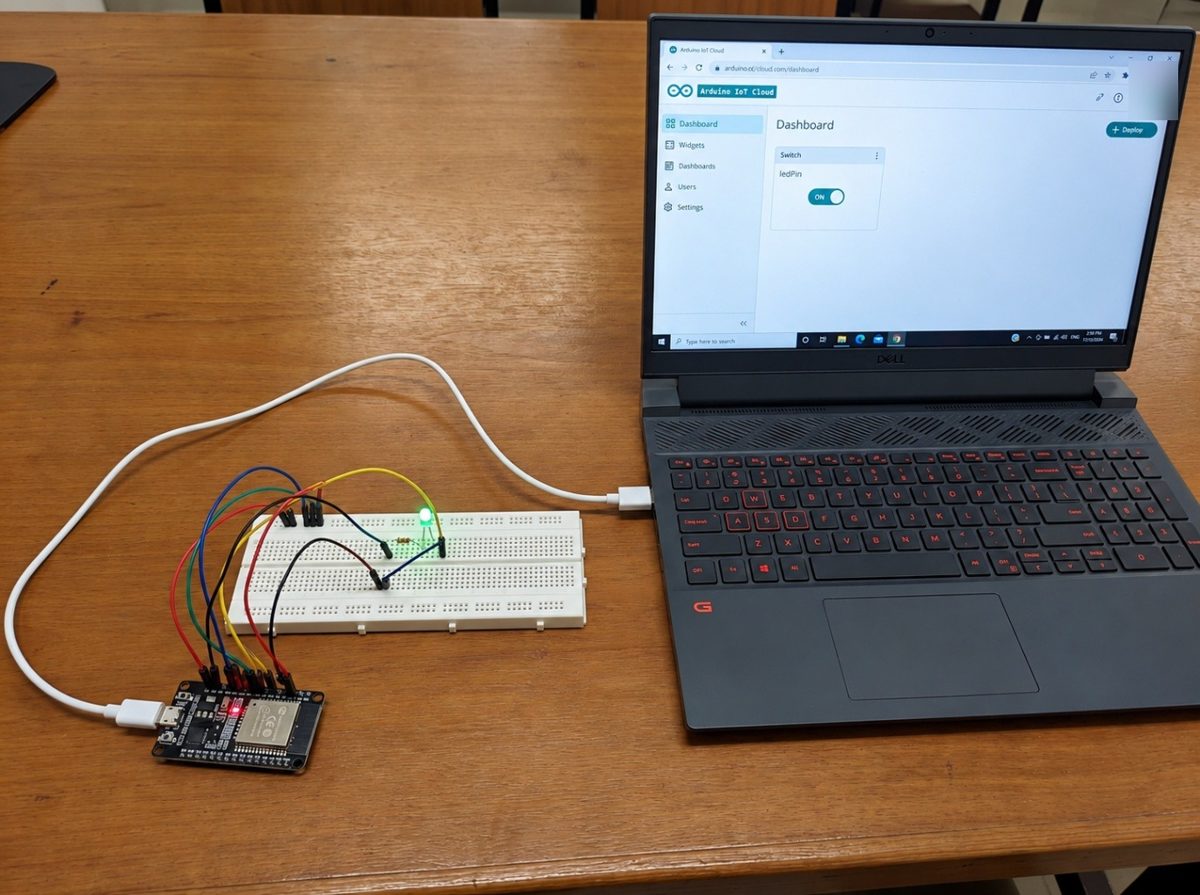
- The laptop shows the Arduino IoT Cloud dashboard with one Switch widget labelled
ledPin, set to ON. - The ESP32 on the left is connected only by its USB power cable; the LED on the breadboard is lit.
- Together: a change made in a browser reached the board through the cloud and drove GPIO 17 HIGH.
Limits and redesign
- Dependency on the vendor and the internet: if the cloud or internet is down, the switch does nothing; there is no local control path.
- Credentials in firmware: Wi-Fi password and device key are compiled in; anyone with the board can extract them.
- Free-tier limits on number of Things, variables and update rates.
- Redesign: add a local fallback (a button, or a LAN API), keep safety logic on the device, and for larger systems use your own MQTT broker or a fleet platform with per-device certificates and over-the-air updates.
Say this in the viva
Viva questions
Why
Why does this work from anywhere when Experiment 6 did not?
Here the device opens an outbound connection to the cloud, which NAT allows. In Exp 6 the device was a server, and inbound connections from the internet cannot reach it.
Why must ArduinoCloud.update() be called constantly?
It keeps the connection alive and processes incoming updates; callbacks only run from inside it.
Why is the variable called ledPin but the pin LED_PIN?
They are different things: ledPin is the cloud Boolean (state), LED_PIN is the GPIO number 17.
What if
What if you add delay(10000) to loop()?
Updates and keepalives stall for 10 s: switch changes arrive late and the connection may time out.
What if the Wi-Fi drops?
The connection handler retries in the background; until it reconnects, dashboard changes cannot reach the board and the LED keeps its last state.
Design
How would you add a temperature reading to the dashboard?
Add a read-only float variable in the Thing (updated periodically), read the DHT22 in loop() on a millis() schedule, assign the variable; the library publishes it.
When would you run your own broker instead?
When you need data ownership, offline local operation, many devices at low cost, or protocols and integrations the platform does not offer.