Experiment 10: Raspberry Pi LED control with MQTT
Experiment 8 used MQTT hidden inside Arduino IoT Cloud. Here you use it directly: a phone publishes “on” or “off” to a topic on a public broker, and a Python program on the Pi, subscribed to that topic, switches the LED. The lab also asks you to explain why a public broker is unsafe, which is the part examiners like to probe.
Objective
- Problem
- Switch an LED on a Raspberry Pi from a phone, through an MQTT broker, so neither side needs the other’s address.
- Interface
- broker
broker.hivemq.com, topicpdeu/led, payloadonoroff(plain text). - Behaviour
on→ LED on,off→ LED off, within a fraction of a second; MQTT Explorer shows the latest value.- Learn
- publish/subscribe, brokers and topics, and the security weaknesses of open brokers (asked in the Observation section).
System
Design decisions
MQTT publish/subscribe instead of HTTP
- Why
- The Pi keeps one outbound connection open and the broker pushes messages to it, so it works behind NAT and reacts at once. Any number of clients can publish or listen on the same topic.
- Alternative
- An HTTP server on the Pi (Exp 6), which only works on the same LAN unless you open ports.
- Switch when
- HTTP for request/response APIs and web pages; MQTT for device commands and telemetry.
A public broker (HiveMQ)
- Why
- Free, no setup, reachable from anywhere: ideal for a lab demo.
- Alternative
- Your own broker (Mosquitto on the Pi or a server) with authentication, or a managed service (HiveMQ Cloud, AWS IoT Core).
- Switch when
- Anything beyond a demo: a public broker gives no privacy and no access control (see Security).
Plain-text payloads “on”/“off”
- Why
- Easy to type in any client and easy to parse.
- Alternative
- JSON such as
{"led": true}, or 1/0. - Switch when
- JSON once a topic carries several fields or needs versioning.
Python on the Pi
- Why
- A few lines with an MQTT client library and a GPIO library; easy to change over SSH.
- Alternative
- An ESP32 subscriber in C++ (PubSubClient).
- Switch when
- Use a microcontroller when the node is battery powered or must be very cheap.
A phone dashboard app as the publisher
- Why
- Buttons bound to topic + payload give a control panel with no coding.
- Alternative
- MQTT Explorer’s publish box, or
mosquitto_pubin a terminal. - Switch when
- Command line for scripts and testing.
What we did
Connected the LED anode to a GPIO pin through a current-limiting resistor, cathode to GND.
Same LED circuit as Exp 1; Pi GPIO is 3.3 V and should stay under about 16 mA per pin, so the resistor is required.
Logged in over SSH and installed the Python GPIO and MQTT client libraries.
The Pi is headless (Exp 9). The program needs a library to speak MQTT and one to drive the pins.
Chose the public broker
broker.hivemq.comand the topicpdeu/led.Every client must agree on broker and topic; the topic is the only “address” in the system.
Wrote and ran a Python subscriber: set up the pin, connect, subscribe to
pdeu/led, switch the LED on each message.It stays in a listening loop; the work happens in the message callback.
Created two buttons in the MQTT Dashboard app, both on topic
pdeu/led, with valuesonandoff.Each press publishes one message.
Connected MQTT Explorer on the laptop to the same broker.
Shows every message on the topic, so you can tell whether a problem is on the publishing or the receiving side.
Pressed on/off and watched the LED and MQTT Explorer.
Checks the whole path end to end.
How MQTT works
| Concept | Meaning | In this experiment |
|---|---|---|
| Broker | the server that accepts connections and routes messages | broker.hivemq.com |
| Client | anything that connects to the broker; can publish, subscribe or both | phone, Pi, MQTT Explorer |
| Topic | a /-separated string used to route messages; no need to create it first | pdeu/led |
| Wildcards | + matches one level, # matches everything below | MQTT Explorer shows the tree pdeu ▸ led |
| Payload | the message bytes; the broker does not look inside | on, off |
| QoS | 0: at most once; 1: at least once (acknowledged); 2: exactly once (4-step handshake) | MQTT Explorer’s publish panel shows QoS 0 |
| Retain | the broker keeps the last message on a topic and gives it to new subscribers | would let the Pi learn the current state after a restart |
| Keepalive | the client pings when idle so both sides detect a dead connection | 60 s is typical |
| Ports | 1883 plain TCP, 8883 TLS; WebSocket ports for browsers | 1883: unencrypted |
One message’s path: the phone sends CONNECT and gets CONNACK, then PUBLISH (topic pdeu/led, payload on). The Pi had earlier sent SUBSCRIBE pdeu/led. The broker matches the topic against its subscriptions and forwards the PUBLISH to the Pi and to MQTT Explorer. The phone never learns who received it.
The subscriber program
- Two callbacks:
on_connectruns after the broker accepts the connection;on_messageruns for every message on a subscribed topic. - Subscribe inside on_connect, so a reconnect after a Wi-Fi drop subscribes again automatically.
- Normalise the payload (
decode,strip,lower), because the payload is just bytes: “ON”, “on ” and “on” should behave the same. loop_forever()handles the network, keepalive pings and reconnects, and calls the callbacks: the same job asArduinoCloud.update()in Exp 8.
import paho.mqtt.client as mqtt
from gpiozero import LED

led = LED(17)                        # example pin: use the one you wired
BROKER, TOPIC = "broker.hivemq.com", "pdeu/led"

def on_connect(client, userdata, flags, reason_code, properties):
    client.subscribe(TOPIC)          # subscribe again after every reconnect

def on_message(client, userdata, msg):
    cmd = msg.payload.decode().strip().lower()
    if cmd == "on":
        led.on()
    elif cmd == "off":
        led.off()
    print(msg.topic, cmd)

client = mqtt.Client(mqtt.CallbackAPIVersion.VERSION2)
client.on_connect = on_connect
client.on_message = on_message
client.connect(BROKER, 1883, 60)     # plain TCP, keepalive 60 s
client.loop_forever()
Written for paho-mqtt 2.x. With paho-mqtt 1.x (for example the Debian package), create the client with mqtt.Client() and use on_connect(client, userdata, flags, rc). gpiozero is preinstalled on Raspberry Pi OS and uses BCM pin numbers.
Reading the outputs
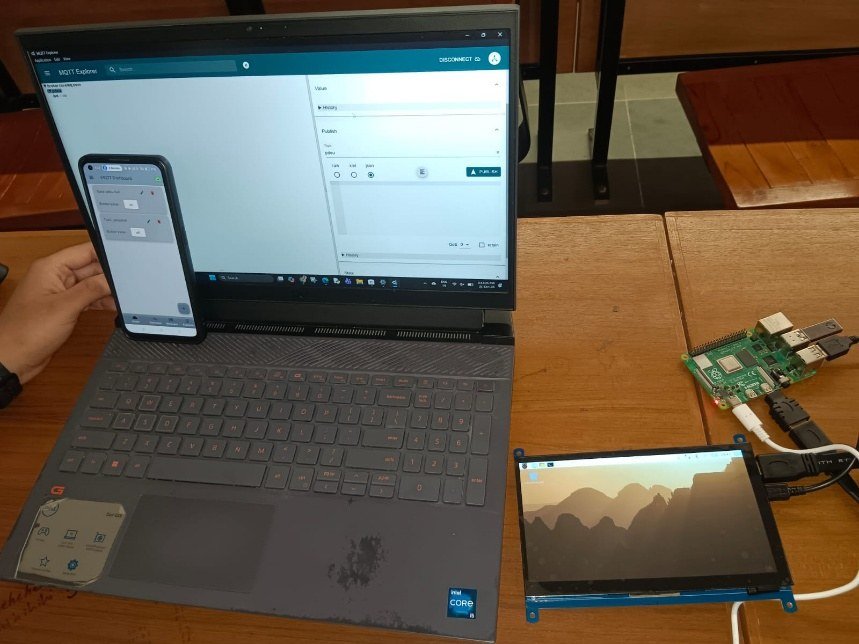
- Right: the Raspberry Pi with its display, powered and booted.
- Laptop: MQTT Explorer connected to the broker, with its Publish panel open.
- Phone, held in front: the MQTT Dashboard app with the two buttons.
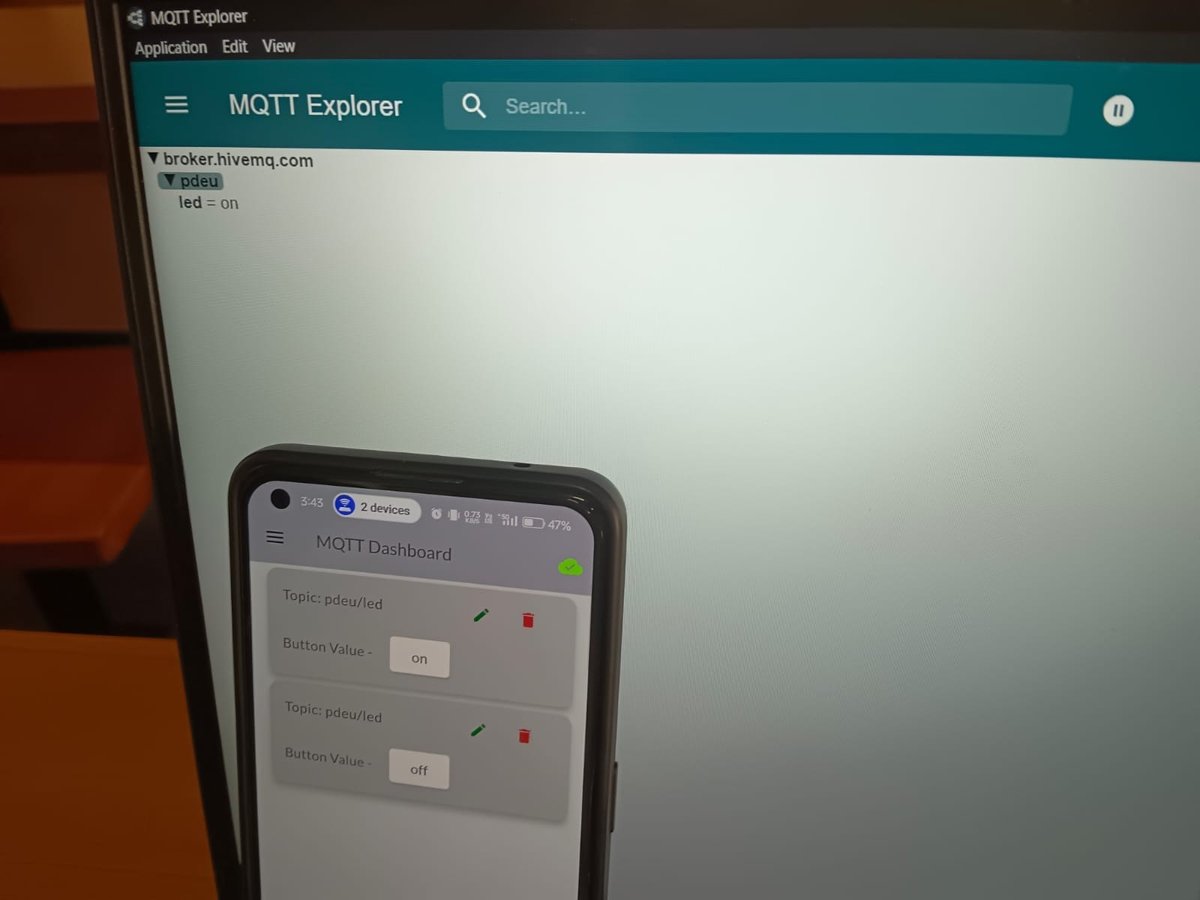
- The tree is broker ▸ topic levels:
broker.hivemq.com▸pdeu▸led, with the last valueon. - The phone shows two cards, both “Topic: pdeu/led”, with button values
onandoff. The green cloud icon means the app is connected to the broker. - The laptop received the phone’s message without knowing the phone exists: publish/subscribe working.
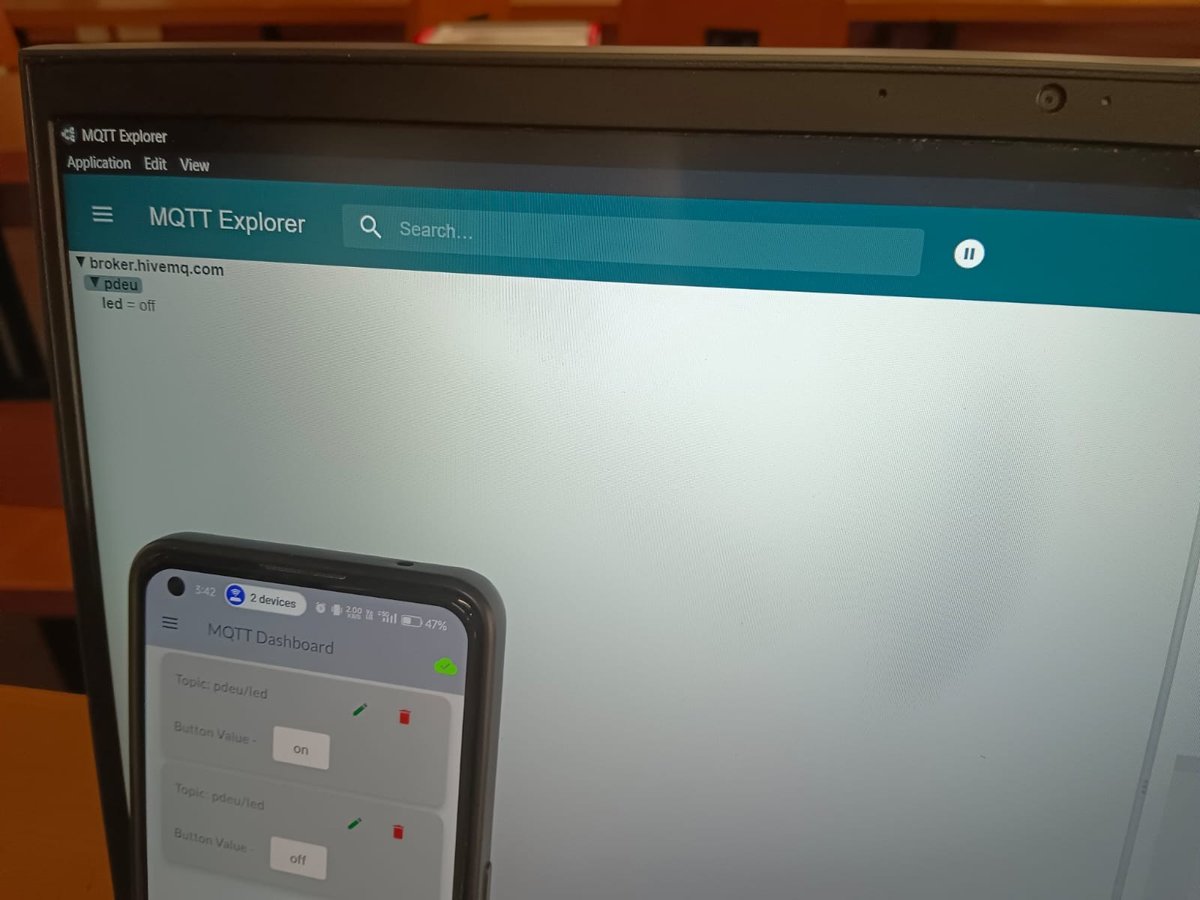
- Same topic, new value
off: each publish replaces what the explorer shows as the latest value. - The Pi, subscribed to the same topic, received the same two messages and switched the LED.
Security of open-source and public MQTT brokers
This is the lab’s Observation question. Learn it as: what is missing, what an attacker does with that, and the fix.
| Weakness | What an attacker can do | Fix |
|---|---|---|
| No encryption (port 1883) | Sniff the network (ARP spoofing, rogue Wi-Fi) and read topics, payloads and any username/password in clear text. | TLS on port 8883. |
| Anonymous access | Connect with no credentials and publish fake commands (switch your LED). | allow_anonymous false, passwords, or client certificates (mutual TLS). |
| No access control lists | Subscribe to # and read all traffic; publish to any device’s topic. | Per-client ACLs: each device may only use its own topics. |
| Denial of service | Open thousands of connections or flood messages (QoS 1/2 costs the broker memory), so real clients are dropped. | Connection and rate limits, message size limits, a firewall. |
| Tampering and replay | Change a message in transit, or re-send a captured “on” later. | TLS, plus a signed payload (HMAC) with a timestamp or counter. |
| Client ID clashes | Connect with the same client ID as your device and the broker kicks your device off. | Unique IDs plus authentication tied to the ID. |
Limits and redesign
- Security: everything in the table above. Redesign: Mosquitto on the Pi or a server with TLS, user accounts and ACLs, or a managed broker with per-device certificates.
- State after restart: the subscriber only knows what it receives. Publish commands with retain, and have the Pi publish its actual state to
pdeu/led/stateso the dashboard shows the truth. - Delivery: QoS 0 can lose a message on a bad link. QoS 1 retries until acknowledged; make the command idempotent (“on” twice is still on), which it already is.
- Liveness: set a Last Will message (for example
pdeu/led/status = offline) so the dashboard knows when the Pi drops off. - Running unattended: start the script as a systemd service so it restarts on boot and after a crash.
Say this in the viva
Viva questions
Why
Why does the Pi not need a public IP address?
It connects out to the broker and keeps the connection open; messages come back over that connection. NAT allows outbound connections.
Why is MQTT called lightweight?
A 2-byte minimum header, one long-lived TCP connection instead of a new request each time, and small keepalive pings.
Why did MQTT Explorer also see the messages?
It is just another subscriber to the topic. The broker delivers each message to every matching subscription.
How is this different from Experiment 8?
Same protocol, but there Arduino IoT Cloud hid it and added TLS and per-device credentials. Here you choose the broker, topic and payload yourself, with no security by default.
What if
What if a classmate also uses topic pdeu/led?
Their messages switch your LED and yours switch theirs: on a public broker topics are shared by everyone.
What if the Pi is off when “on” is published?
With QoS 0 and no retain the message is gone. With retain, the broker gives the last value to the Pi when it subscribes again.
What if the payload is “ON” in capitals?
A strict comparison would ignore it; normalise the payload with lower().
Design
Secure this for a real product.
Own broker or managed service; TLS on 8883; a certificate or credentials per device; ACLs so each device uses only its own topics; retained state topic; Last Will for status; rate limits.
QoS 0, 1 or 2 for a door lock command?
At least QoS 1 so it is not lost, with an idempotent command and a state topic to confirm. QoS 2 costs an extra round trip and rarely adds much if commands are idempotent.